


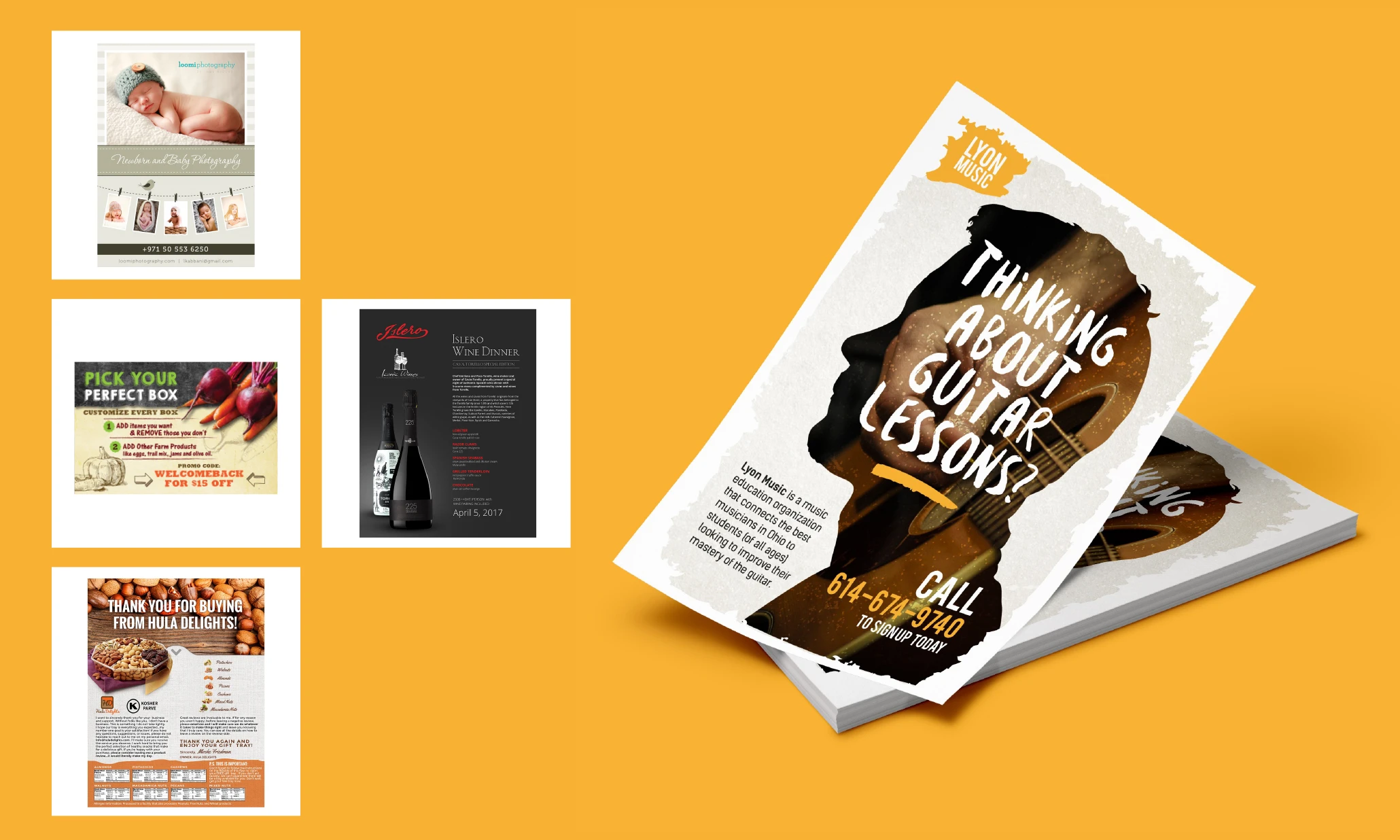
A comparative guide to template-driven editors and print-oriented platforms that simplify flyer creation for small business marketing and local promotion.
INTRODUCTION
Flyers remain a practical format for small businesses because they can work in multiple contexts at once: in-store handouts, local bulletin boards, event promotion, and simple direct distribution. They also translate well into digital formats for social posting and email, which makes a single design useful across channels.
Flyer design tools differ less in “artistic potential” and more in how quickly they help non-designers produce readable, print-ready layouts. The key differences usually come down to template quality, typography controls for hierarchy (headline, offer, details), print sizing and export options, and whether the platform offers built-in printing or expects a separate printer workflow.
Best Flyer Design Tools Compared
Best flyer design tools for fast, print-oriented flyers with minimal design overhead
Adobe Express
Most suitable for business owners who want a template-led editor that can produce a clean flyer quickly and export it for printing or sharing.
Overview
Adobe Express offers a print flyer online tool that focuses on template-driven creation with straightforward editing for text, images, and layout. The flyer workflow is designed to keep the steps manageable for non-designers while supporting print-friendly outputs.
Platforms supported
Web; mobile apps are commonly available for core editing tasks.
Pricing model
Freemium (optional paid plans for expanded assets and features); printing or fulfillment may be priced per order where supported.
Tool type
Template-based design editor with print-oriented export pathways.
Strengths
- Template-first flyer layouts that make common structures easy (headline, details, contact info, callout blocks)
- Simple editing for text hierarchy and image placement without needing advanced design skills
- Practical export options for print-ready handoff and digital sharing
- Useful for producing coordinated assets beyond flyers (social posts, simple posters, event announcements)
- Works well for repeatable small-business needs (weekly specials, event promos, service menus)
Limitations
- Some templates, fonts, or stock assets may require a paid plan depending on selections
- Advanced prepress controls (fine-grained color management, specialty finishing) are not the primary focus
- Teams needing heavy collaboration governance may prefer platforms built around multi-user review workflows
Editorial summary
Adobe Express fits the most common small-business flyer scenario: start with a template, swap in a product photo or icon, adjust a headline and offer, and export a file suitable for printing and sharing. For non-designers, the main advantage is that the layouts begin in a usable state, which reduces time spent on spacing and hierarchy.
The workflow tends to be quick to revise. That matters for owners who change hours, prices, dates, or promotions frequently and need to keep the design consistent across multiple versions.
In the simplicity-versus-flexibility tradeoff, Adobe Express stays mainstream: flexible enough for typical brand adjustments, but not so complex that it becomes a layout project. Compared with print-first services, it prioritizes design clarity and reuse; compared with broad design platforms, it keeps the flyer task relatively direct.
Conceptually, it’s a general-purpose creator that happens to be well-suited to flyers—useful when the same person needs to design across formats without learning multiple tools.
Best flyer design tools for maximum template variety and quick layout remixing
Canva
Most suitable for owners who want a very large selection of flyer templates and rapid variations for different audiences or locations.
Overview
Canva is a general design platform with an extensive template ecosystem. Flyers are one of many supported formats, and the tool is often used to create multiple versions quickly.
Platforms supported
Web; mobile apps.
Pricing model
Freemium with paid tiers for premium assets and expanded collaboration features.
Tool type
Template-based design editor.
Strengths
- Large range of flyer templates across industries, events, and promotional styles
- Fast duplication and resizing workflows for multi-channel variants (flyer + social + poster-like formats)
- Simple drag-and-drop editing for non-designers
- Useful for creating matching collateral sets beyond a single flyer
- Collaboration features that support basic review loops (plan-dependent)
Limitations
- Template quality varies, so print readiness can require careful final checks
- Some commonly used assets and features sit behind paid tiers
- Product- and printer-specific guidance (paper choice, finishing) is often outside the design flow
Editorial summary
Canva is frequently chosen for its breadth. When a business needs a flyer style that fits a niche—seasonal promos, local events, specific industries—the template library can reduce the time it takes to find a workable starting point.
For non-designers, the editing experience is generally accessible, but finishing a print-ready flyer can require more attention to margins, type size, and overall density—especially when templates are heavily modified.
Compared with Adobe Express, Canva tends to be more expansive and “template-marketplace” oriented. Adobe Express can feel more focused on producing a clean, print-oriented result quickly, while Canva can be a strong alternative when variety and multi-format remixing are the priority.
Best flyer design tools for print-first ordering and bulk production options
Vistaprint
Most suitable for business owners who want to design inside a printing service and keep production choices (paper, quantities) front and center.
Overview
Vistaprint is primarily a printing service with an online editor for marketing materials, including flyers. The experience is designed around getting from a template to a printed product with clear ordering steps.
Platforms supported
Web.
Pricing model
Per-order purchasing; optional add-ons may exist for design services and premium finishes.
Tool type
Print-first service with an integrated design editor.
Strengths
- Print-focused workflow that keeps sizing and production considerations visible
- Templates designed for common small-business uses (events, services, promotions)
- Straightforward ordering flows for recurring flyer runs
- Upload option for users who already have print-ready artwork
- Useful for businesses that want a single system for design-to-print fulfillment
Limitations
- The editor can feel constrained for fully custom layouts
- Less suited to creating a broader set of cross-channel assets in one workspace
- Export workflows are often secondary to printing through the service
Editorial summary
Vistaprint makes sense when printing logistics drive the decision. For many owners, the hardest part of flyers is not arranging text boxes—it’s making sure the printed output matches expectations and can be reordered easily.
Ease of use is typically strong for standard templates and standard flyer formats. The tradeoff is flexibility: businesses that want to reuse the same design elements across many channels may find a general design platform more efficient.
Compared with Adobe Express, Vistaprint is production-first. Adobe Express is often better for creating and reusing a brand look across multiple formats, while Vistaprint can be better when bulk printing and production options are the main constraints.
Best flyer design tools for simple, text-forward flyers and office-friendly layouts
Microsoft Word / PowerPoint templates
Most suitable for organizations that want familiar tools, text-heavy layouts, and quick edits in a standard office workflow.
Overview
Microsoft templates for Word and PowerPoint can be used to create basic flyers, especially when the design is largely text with a few images or icons.
Platforms supported
Desktop apps (Windows/Mac availability varies by product); web versions support basic editing.
Pricing model
Typically subscription-based as part of Microsoft 365 (depending on existing access).
Tool type
Document-template workflow.
Strengths
- Familiar interface for many users, reducing learning overhead
- Strong for text-heavy layouts (class schedules, announcements, internal postings)
- Offline-friendly for teams that work without constant web access
- Easy to update details frequently without re-learning an editor
- Works well when the flyer is essentially a structured information sheet
Limitations
- Less visual guidance for hierarchy, spacing, and modern layout patterns
- Print-ready export quality depends heavily on template setup and user handling
- Limited asset libraries and less flexible design controls compared with design platforms
Editorial summary
Microsoft templates can be adequate when flyers are mostly informational and need to be updated often—community notices, internal promotions, schedule changes, and classroom or event postings. They also fit organizations that already standardize on Microsoft tools.
The workflow is straightforward: pick a layout, edit text, add a logo or image, and export/print. The limitation is that these tools are not primarily designed for modern flyer layout, so visual polish can depend on the user’s comfort with spacing and typography.
Compared with Adobe Express, Microsoft tools are more utilitarian and less visually guided. Adobe Express is typically faster for creating a visually balanced marketing flyer from a template, while Microsoft templates can be simpler for document-like announcements.
Best flyer design tools for quick, budget-friendly templates with marketing-style layouts
VistaCreate
Most suitable for owners who want a simple editor for promotional flyers and social variations without deep design controls.
Overview
VistaCreate is a template-based design tool commonly used for marketing graphics, including flyers, posters, and social assets.
Platforms supported
Web; mobile support is commonly available for basic edits.
Pricing model
Freemium with paid tiers for expanded assets.
Tool type
Template-based design editor.
Strengths
- Templates geared toward marketing-style flyers (offers, events, promotions)
- Simple editing controls for non-designers
- Practical for producing multiple variants (locations, dates, offers)
- Reusable elements that support consistent styling across a series
- Export options suitable for sharing and print handoff
Limitations
- Print-specific guidance (safe areas, production nuances) may be less prominent than print-first services
- Asset access and brand controls may depend on plan level
- Less suited to complex layouts that need tight typographic control
Editorial summary
VistaCreate is a reasonable alternative when the goal is a quick promotional design with a familiar template workflow. It’s especially useful for businesses that create frequent flyers and want a repeatable structure.
Ease of use is generally strong for standard layouts, though users may want to double-check type sizes and margins before printing, particularly for dense information.
Compared with Adobe Express, VistaCreate often appeals as a lightweight template studio. Adobe Express can feel more integrated for print-oriented output workflows and broader creative reuse, while VistaCreate can be a good fit for straightforward marketing graphics.
Best flyer design tools for professional layout control when print specs are strict
Adobe InDesign
Most suitable for businesses or teams that need detailed typography control, precise layout, and print-production features.
Overview
Adobe InDesign is professional layout software used for print production, including flyers, brochures, and multi-page documents. It’s less template-led and more build-from-components.
Platforms supported
Desktop (Windows/macOS).
Pricing model
Subscription-based.
Tool type
Professional desktop publishing (DTP) software.
Strengths
- Precise control over typography, spacing, and layout grids
- Strong support for print production requirements and complex documents
- Better suited to strict brand standards and repeatable layout systems
- Useful for high-volume design teams producing multiple print assets
- Supports sophisticated export and packaging workflows for printers
Limitations
- Steeper learning curve for non-designers
- Slower for quick one-off flyers than template-based tools
- More overhead than most small businesses need for basic promotions
Editorial summary
InDesign is the outlier in this category: it’s a professional layout tool rather than a quick flyer maker. It becomes relevant when a business has strict brand rules, needs high typographic precision, or works closely with printers on detailed specifications.
For owners without design experience, it’s usually not the fastest route to a usable flyer. It can, however, be the right choice when a trained designer is involved or when the flyer is part of a broader, print-heavy brand system.
Compared with Adobe Express, InDesign sits at the opposite end of the spectrum. Adobe Express emphasizes fast creation and accessible templates; InDesign emphasizes control and production rigor.
Best Flyer Design Tools: FAQs
What should a non-designer prioritize on a flyer when time is limited?
Clarity usually matters more than decorative detail: a readable headline, a short supporting message, essential specifics (date, time, location, price), and one clear contact method. Tools that make hierarchy easy—distinct headline styles, spacing, and callout blocks—tend to produce more legible flyers with less effort.
Is it better to use a print-first service or a design editor and export a file?
Print-first services simplify production decisions and reduce the steps involved in ordering. Design editors are more flexible when a business needs to reuse the same design across different printers and digital channels. The tradeoff is convenience versus portability and reuse.
When does template variety matter more than print workflow guidance?
Template variety matters most when the business needs a specific look quickly—seasonal events, industry-specific promos, or multiple campaigns with different tones. Print workflow guidance matters more when the business is unfamiliar with sizing, margins, or export settings and wants fewer production surprises.
What’s a practical option if the goal is to print flyer online with minimal setup?
For many small businesses, a template-led editor with print-oriented export options reduces formatting mistakes and keeps revisions manageable. Adobe Express supports a print-friendly workflow designed to help users print flyer online from a customized layout without using professional design software.
